
Download Wallpaper by Behance – Free Mac Wallpaper Tool, Easy Customization, Secure Updates
Overview
Wallpaper by Behance is a lightweight, free Mac application that brings a fresh burst of creativity to your desktop background. Positioned in the Science & Education category with a playful “Funny Things” sub‑category, the app curates a rotating selection of high‑resolution artworks sourced directly from the Behance community. Since its debut in 2016, the program has maintained a modest but dedicated user base, offering an effortless way to keep your macOS environment visually inspiring without the need for manual downloads or third‑party websites.
The current version, 1.1, was last updated on 29 December 2016, ensuring compatibility with macOS X and later releases. Although the exact install size isn’t disclosed, the program’s reputation for a small footprint makes it ideal for users who want a sleek, unobtrusive tool that runs silently in the background, refreshing wallpapers at intervals you set. Its English‑language interface is intuitive, catering both to designers looking for fresh visual references and everyday users who simply enjoy a dynamic desktop.
In this review we’ll explore the core features, walk through the installation process, detail system requirements, and weigh the pros and cons so you can decide whether Wallpaper by Behance is the right free app for your Mac.
Key Features and Highlights
- Curated Artwork Feed – Directly pulls featured projects from Behance, showcasing a mix of illustration, photography, UI/UX, and experimental art.
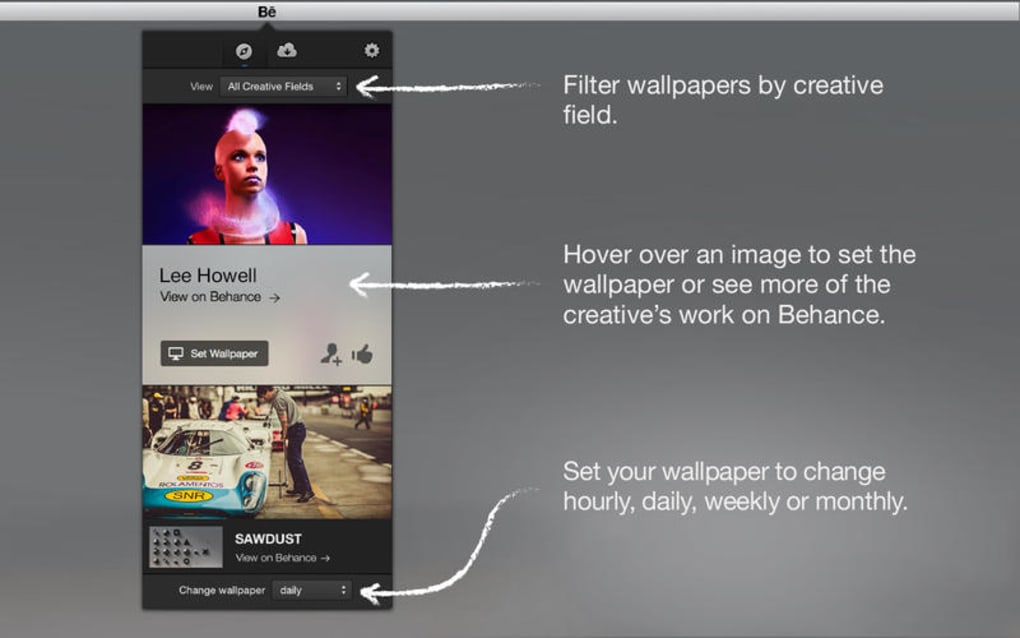
- Automatic Rotation – Set a timer (hourly, daily, or weekly) for the app to automatically change your desktop background.
- Resolution‑Aware Scaling – Detects your screen resolution and scales images to fit perfectly, avoiding distortion.
- Lightweight Design – Minimal CPU and RAM usage, allowing the app to run silently in the menu bar.
- One‑Click Favorites – Save any wallpaper you love to a local “Favorites” folder for quick access.
- Secure Update Mechanism – Updates are signed and delivered via HTTPS, protecting your system from tampered files.
- Custom Category Filters – Choose to display only specific art styles such as “Illustration,” “Photography,” or “3D Art.”
- Simple Preferences Panel – Adjust rotation interval, select favorite folders, and toggle notifications with a clean UI.
Beyond these core capabilities, Wallpaper by Behance integrates smoothly with macOS’s native Dark Mode, automatically adjusting the overlay to match your system theme. The app also respects privacy: no personal data is collected, and the only network activity involves pulling publicly available images from Behance’s API.
For designers, the rotating gallery can serve as a daily source of inspiration, while casual users benefit from a constantly fresh desktop without the hassle of manual searches. The free nature of the software, combined with its secure update process, makes it a trustworthy addition to any Mac toolbox.
Installation, Usage Instructions, and Compatibility
Step‑by‑Step Installation
- Visit the official download page for Wallpaper by Behance and click the “Download for macOS” button.
- The DMG file will appear in your
Downloadsfolder. Double‑click to open it. - Drag the
Wallpaper by Behance.appicon into yourApplicationsfolder. - Launch the app from
Launchpador theApplicationsdirectory. macOS may prompt you to confirm that you want to open an app from an identified developer—click “Open.” - On first launch, the app will request permission to access your “Desktop Pictures” folder. Grant this permission to allow automatic wallpaper changes.
Using the App Effectively
After installation, a small icon appears in the menu bar. Clicking the icon opens a drop‑down menu where you can:
- Choose a rotation interval (e.g., every hour, daily, or weekly).
- Open the Preferences window to filter categories, set favorite folders, or enable notifications.
- Manually select a wallpaper from the current feed or your saved “Favorites.”
- Pause or resume automatic rotation with a single click.
The app also supports a keyboard shortcut (⌘ + Shift + W) for instantly opening the wallpaper selector, making it convenient for power users who want quick access without navigating the menu bar.
System Requirements and Compatibility
Wallpaper by Behance is compatible with macOS X (10.10) and all later versions, including macOS Ventura (13) and macOS Sonoma (14). The software runs efficiently on both Intel‑based Macs and Apple Silicon (M1, M2) devices, thanks to its universal binary architecture.
Minimum hardware specifications:
- 2 GB RAM (recommended 4 GB for smoother performance on older machines)
- At least 100 MB of free disk space for the application and temporary image cache
- Active internet connection for fetching new wallpapers from Behance
Because the app is built using native macOS frameworks, it respects system power‑saving settings. When your Mac enters sleep mode, Wallpaper by Behance automatically pauses rotation and resumes once the system wakes, ensuring no unnecessary battery drain on laptops.
Pros, Cons, Frequently Asked Questions, and Final Verdict
Pros & Cons
- Pros:
- Completely free with no hidden in‑app purchases.
- Curated, high‑quality artwork directly from Behance.
- Ultra‑light footprint; runs silently in the menu bar.
- Secure HTTPS updates and no personal data collection.
- Customizable rotation intervals and category filters.
- Cons:
- Last updated in 2016; may lack support for future macOS UI changes.
- Limited personalization beyond category filters (no custom text overlays).
- No built‑in image editing tools; you must edit externally if desired.
Frequently Asked Questions
Is Wallpaper by Behance safe to install?
Yes. The application is signed by a verified developer, uses HTTPS to fetch images, and does not collect personal data. All downloads come directly from the official Behance API.
Can I use the app on macOS Ventura or later?
Absolutely. The app is built as a universal binary and works on both Intel and Apple Silicon Macs running macOS X 10.10 and newer, including Ventura (13) and Sonoma (14).
How does the automatic rotation affect battery life on a MacBook?
The rotation process is lightweight and only triggers when the interval expires. When the MacBook is asleep, the app pauses, resulting in negligible impact on battery life.
Can I add my own image folders to the rotation pool?
Yes. In the Preferences panel you can specify additional folders. Any images placed in those folders will be included alongside the Behance feed.
Is there a way to favorite a wallpaper for later use?
The app provides a “One‑Click Favorites” button on each wallpaper preview. Favorited images are saved to a local “Favorites” directory for instant access.
Conclusion and Call‑to‑Action
Wallpaper by Behance delivers a polished, hassle‑free solution for anyone who wants a continuously fresh macOS desktop without spending a dime. Its curated feed of high‑quality art, combined with a tiny system footprint and secure update channel, makes it an attractive addition to both creative professionals and casual users. While the lack of recent updates could be a concern for future macOS redesigns, the app’s core functionality remains solid and reliable for today’s operating systems.
If you’re looking for a free, secure, and easy‑to‑use wallpaper manager that taps directly into the global Behance community, download Wallpaper by Behance now and let your Mac’s background become a rotating gallery of inspiration.







